Top Panel
Note: in the current AdminLTE UI, this is the header bar at the top of the screen, next to the sidebar rather than under a menu bar. Screenshots updated August 2026.
The header bar at the top of the screen contains:

Logo
Your administrator can replace this logo with your own. Click it to soft-refresh: it reloads the current module without reloading the whole application, which is faster than hitting your browser's refresh button.

Action Bar
The Action Bar is where a module puts its buttons for the operations you can perform there — editing, saving, deleting, or creating records, and jumping to other modules. Like any database application, Epesi supports the standard CRUD operations on records:
- Create
- Read
- Update
- Delete
Epesi adds two more on top of that: you can clone a record, and every change is kept in an editing history — records are never permanently deleted, so an administrator can always restore one.

The Action Bar's buttons change depending on which module you're in. The one pictured above is the default for the Dashboard.
Launchpad
The Launchpad button is a quick way to jump to a particular module. Unlike the sidebar menu, which always lists everything you have access to, the Launchpad can be customized to show only the modules you use most often.
Global search and filter box
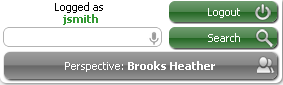
Login indicator

Logout button
 Closing the browser is usually enough, but click Logout to explicitly end your session — it clears the cookie left by "Remember me," so the next visit requires logging in again. Use it on any public or shared computer to keep your account safe.
Global search
 Searches for a word or phrase across all your records — Contacts, Companies, Notes, and more.
Perspective
 Some modules use this to filter records down to just the ones assigned to you. Grayed out means it's currently inactive.